Qlero
Buyer's guide

The best royalty management software for record labels in 2026

“Best” is not a logo — it is whichever platform survives your catalog, your contracts, and your period close. This guide gives you the seven criteria that actually separate royalty platforms, drawn from the evaluation conversations we have with labels every week.

Last updated: September 7, 2026

The short answer

The best royalty management software for a record label in 2026 is the platform that processes periods reliably at your scale, imports any sales file with previewable mapping, models your actual deal terms, reconciles without manual re-imports, logs who changed and approved what, gives artists transparent statements and payouts, and can demonstrate a concrete migration path for your historical data. Evaluate every vendor — including Qlero — against those seven criteria with your own catalog data.

The seven criteria that matter

1. Processing that survives scale

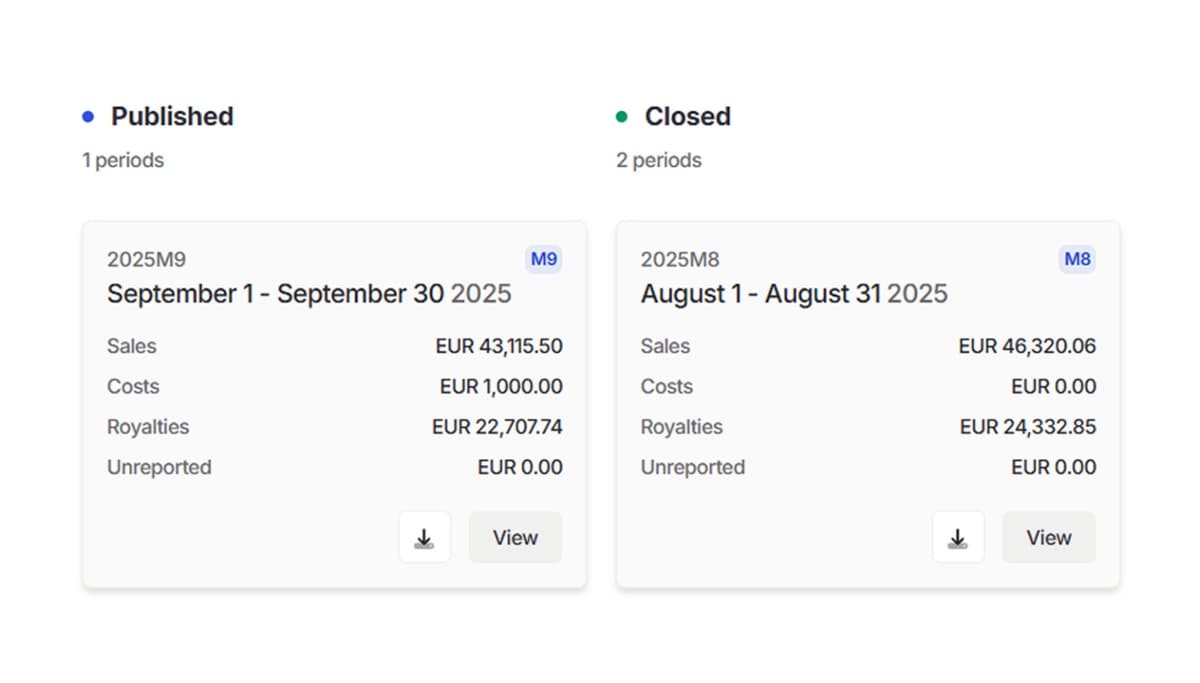
Royalty runs grow with the catalog. A platform should process a period without multi-day batch jobs or crashes that force restarts, and let you validate numbers in a draft state before anything is published. Look for a draft, review, publish, and close workflow — calculation-only runs you can inspect before a single statement goes out.

2. Imports you can preview, not pray over

Sales files arrive from every DSP and distributor in different shapes. The difference between hours and minutes is whether the platform lets you map columns with a live preview of transformations before processing — and whether those mappings are saved as reusable templates instead of rebuilt each period.

3. Contract depth without a developer

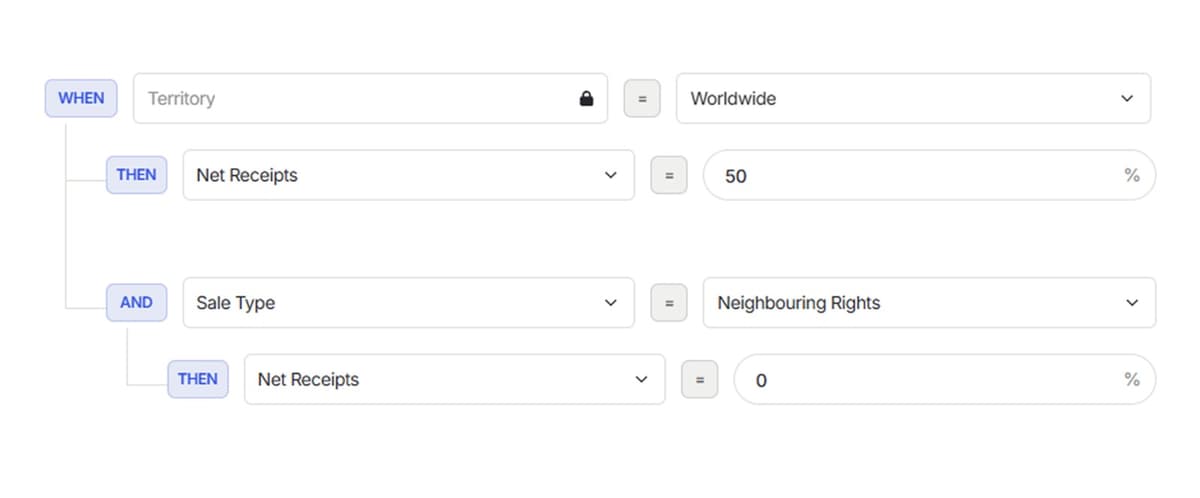
Splits, advances, recoupments, escalations, and cross-release terms should be expressible by the royalty team directly. Tree-structured deal models let you define terms once and apply them across artists and releases — and change them later without filing a ticket to IT.

4. Reconciliation without re-imports

Unmatched or unreported sales are a fact of life. If handling them means extracting rows and re-importing them next period, you have a duplicate-data risk built into the workflow. The platform should carry unreported sales forward into the next period automatically.

5. Auditability by default

Who changed the contract, who requested the payment, who approved it — a serious platform answers these from its audit log, with permissions that can be limited by responsibility and payment thresholds. If auditability is an add-on, statements become arguments.

6. Artist-facing transparency

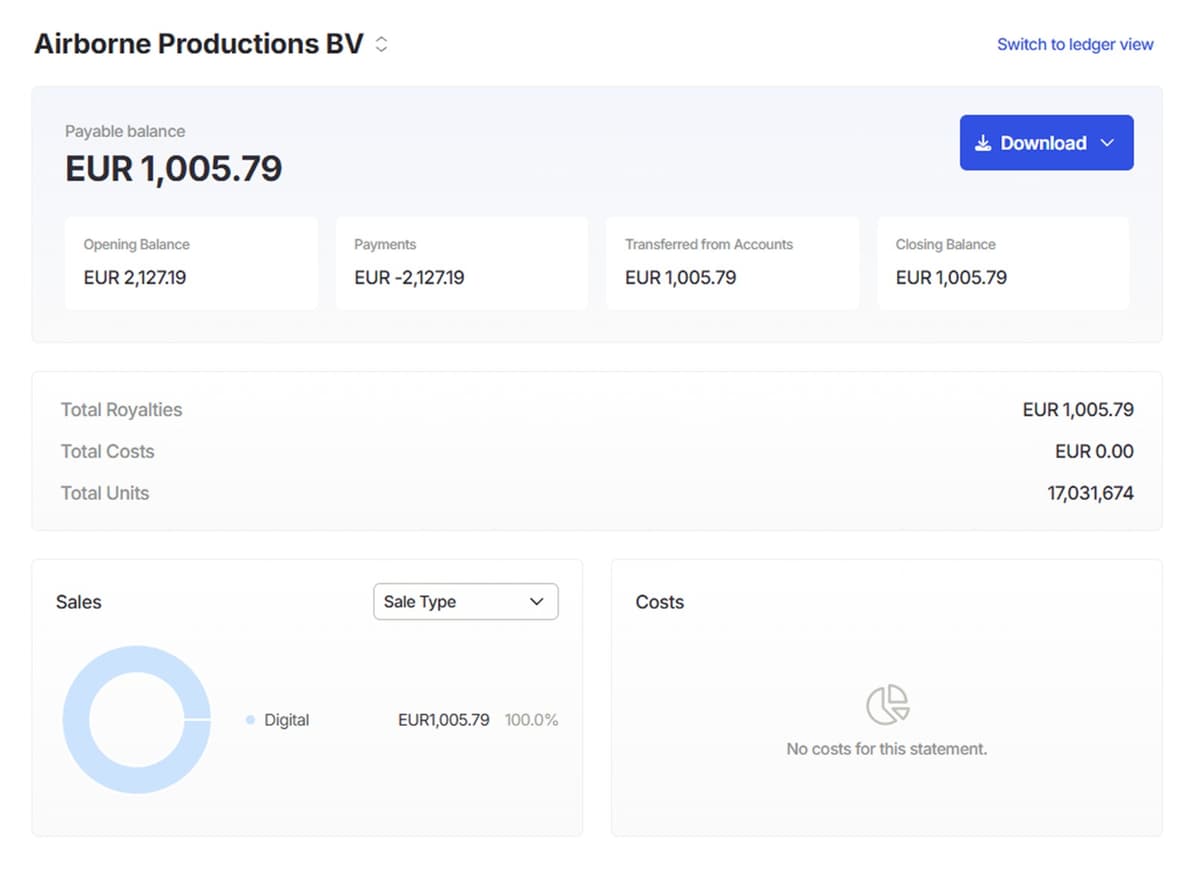
Artists increasingly expect to see their own numbers. Statement portals, payment requests with label-side approval, self-bill invoicing, and payment-file export reduce the invoice-checking and manual admin that consumes label teams around payout time.

7. A migration path you can believe

The best software is worthless if you can't get onto it. Ask any vendor how historical statements and opening balances come across, whether a parallel run is supported, and how a cutover aligns with reporting-period boundaries. Vague answers here predict painful migrations.

Ten questions to bring to every vendor demo

Use the same files, agreement, and expected statement for each evaluation. For every question, record what you saw, what needs follow-up, and who owns the answer. That gives your team a comparison grounded in your work.

  1. Can it read our actual sales files?

    Bring a representative distributor export, including one awkward format. Ask to see the mapping, validation feedback, duplicate handling, and what happens when next month’s file changes a column. A supported-source logo is only the start of the test.

  2. How does it handle unmatched catalog data?

    Introduce a missing identifier or an unknown release. Follow the row through investigation, correction, and calculation. Confirm how the team can find unresolved income again without making a second copy of the source data.

  3. Can it express our most complicated signed agreement?

    Use an agreement with a meaningful exception: territory, revenue base, reserve, escalation, or cross-recoupment. Ask the person who will own royalties to explain the resulting rules. Record which terms need configuration, additional services, or custom work.

  4. Can we inspect and recalculate a draft period?

    Ask for a calculation, a correction, and a second calculation using the same data. Check what changes, what is recorded, and whether artists can see anything before your team has approved the statements.

  5. What happens to late income and historical adjustments?

    Add a report after the original period has closed. Establish how the platform treats the original sales dates, the accounting period, corrections, and income carried into a future run. Compare the output with your reporting policy.

  6. Can we reconcile a payee’s opening and closing balance?

    Follow one payee from opening balance through royalties, costs, advances, reserves, and payments to closing balance. The team should be able to explain each movement and export the detail needed for reconciliation.

  7. What can an artist see and download?

    Review a statement from the artist’s perspective. Check the period, identifiers, splits, deductions, balance movements, and available downloads. Ask which portal, branding, and payout capabilities are included in the quote.

  8. Can we separate labels and responsibilities?

    Try the access levels your team actually needs: royalty preparation, approval, finance, external label clients, and payees. Confirm who can view, edit, publish, export, and approve payments, including across multiple entities.

  9. How will migration and the first close be verified?

    Agree the history to retain, the opening balances to reconcile, and the responsibilities for data cleanup. Ask how a parallel run would work, who reviews differences, and what evidence must be accepted before cutover.

  10. What is the full cost at our expected scope?

    Compare the billing unit, included volume, growth tiers, entities, migration, API access, branding, and support. For an international team, also confirm billing currency, applicable taxes, and payment charges. Request the assumptions in writing.

Comparing Qlero, Curve, Tone, Royalti, and LabelGrid

Published product descriptions help build a shortlist. The summaries below reflect the vendors’ own pages, reviewed on September 7, 2026; they are not independent performance tests. Qlero publishes this guide. Ask every vendor, including us, to demonstrate the workflow and confirm the quoted scope.

Publicly described workflows and questions to verify in a demo
PlatformPublicly described workflowWhat to verify for your label
QleroReusable file maps, tree-structured deal models, period control, and artist statements.Qlero workflowWalk through your master-royalty period and confirm migration, publishing requirements, and the sales-row pricing scope.
CurveIts documentation connects sales templates, catalog, contracts, payees, periods, and statements.Curve documentationDemonstrate your contracts and reporting cycle, then confirm which company and reporting capabilities are included in the proposed plan.
ToneIts product page describes revenue tracking, contract simulation, period processing, statements, and integrated payments.Tone product overviewDemonstrate your reconciliation and cost treatment, then confirm payment availability, fees, and support for your operation.
RoyaltiIts product page describes statement imports, splits, advances, recoupment, reporting, and artist portals.Royalti product overviewRun your actual agreements and source files, and confirm the plan limits and billing basis for your expected volume.
LabelGridIts accounting page describes royalty calculation, splits, and statements within its label platform.LabelGrid accounting overviewClarify how your existing distribution setup, outside-source income, agreement exceptions, and reporting periods would fit.

Qlero starts at €200/month. Pricing starts with the annual sales rows your team expects to process. Your order form confirms the final scope and usage limits. For the full commercial scope, explore Qlero pricing. A working setup you already trust may remain the right choice; switching should solve a specific operational problem that the evaluation demonstrates.

How Qlero measures up

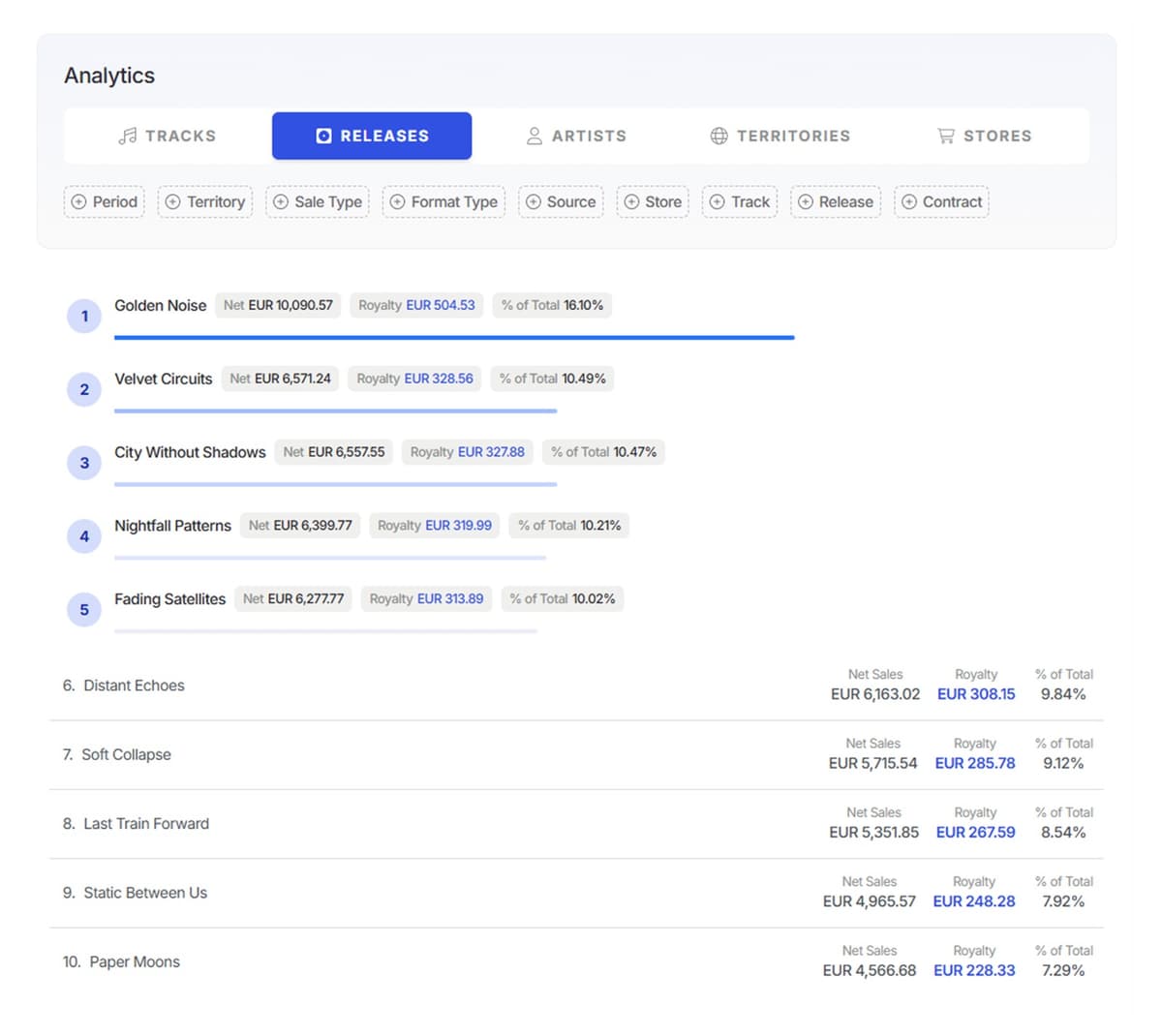
Qlero was built against these criteria: draft, review, publish, and close workflows for every period; a flexible import builder with live column-mapping preview and reusable templates; tree-structured deal models the royalty team manages directly; automatic rollover of unreported sales into the next period; audit logs with role-based permissions and payment approval flows; artist statements with a request-to-payment workflow including self-bill invoicing and payment-file export; and structured migration of historical statements and opening balances. Labels and rights teams across Europe, the Middle East, and North America — from STMPD RCRDS to Coalition Music — run their royalties on it.

What labels say

“The Qlero team has been competent, responsive, and highly supportive throughout the entire process.”
Omid Khalvati · Prisma Music Group
“We've been looking for a royalty platform that actually understands how a modern label operates, not just a glorified spreadsheet with a login. Qlero gets the technical depth right, and that's rare in this space.”
Watse de Jong · STMPD RCRDS
“For us it came down to two things: data accuracy and artist transparency. Qlero delivers on both, and the team moves fast, which matters when you're scaling a catalog.”
Steven Hiemstra · STMPD RCRDS

Common questions

What is royalty management software?

Royalty management software calculates and reports the money owed to artists, songwriters, and other rights holders. It ingests sales data from DSPs and distributors, applies the deal terms in each contract (splits, advances, recoupments), and produces royalty statements and payments — replacing the spreadsheets most labels start with.

When does a label outgrow spreadsheets?

Common breaking points are catalog growth (hundreds of releases with different deal terms), multi-source income that must be reconciled each period, artist disputes over statements, and royalty runs that take days instead of hours. If a period close depends on one person and one workbook, the label has outgrown the spreadsheet.

What does royalty management software cost?

Pricing typically scales with catalog size, number of payees, and processed volume rather than a flat fee. Qlero publishes its plans at qlero.io/pricing — for most labels the relevant comparison is not the license fee but the cost of the manual hours, errors, and disputed statements the software removes.

How long does migrating to a royalty platform take?

It depends on the state of the catalog data and how much history needs to move. A credible migration covers historical statements, opening balances, and recent-period reconciliation before cutover — often aligned to a reporting-period boundary, sometimes with a parallel run. Ask the vendor to walk through their process with your actual data before committing.

What should a record label look for in royalty software in 2026?

Seven things: processing reliability at scale, imports with previewable column mapping, contract depth the royalty team can manage themselves, automatic rollover of unreported sales, audit logs and approval controls, artist-facing statements and payout workflows, and a concrete migration path for historical data.

See Qlero with your workflow.

Bring your catalog, deal terms, or reporting questions. We'll show you the parts that matter to your team.

Qlero analytics
Qlero deal rules
Qlero accounting periods
Qlero artist statement
Qlero top tracks
Qlero sales files